Ever stared at your gaming setup and thought, “This looks amazing,” but 30 minutes later, your eyes feel like they’re on fire? I get it. Cool aesthetics are great, but if your lighting setups gaming rooms cause eye strain or break immersion, what’s the point?
This isn’t just about following flashy trends. It’s about using ergonomics and gameplay principles to boost your experience. Trust me, I’ve been there.
You want a pro-grade lighting environment, right? This guide promises a layered approach to solve those core problems. Ready to transform your gaming sanctuary into a space that enhances performance and comfort?
Layer 1: Master Ambient Light for Gaming Bliss
Let’s talk lighting. Specifically, ambient lighting. The unsung hero of any serious gaming room.
You know the feeling: your eyes burn after hours of staring at a bright screen in a dark cave. That’s digital eye strain, my friend. And it’s a real buzzkill.
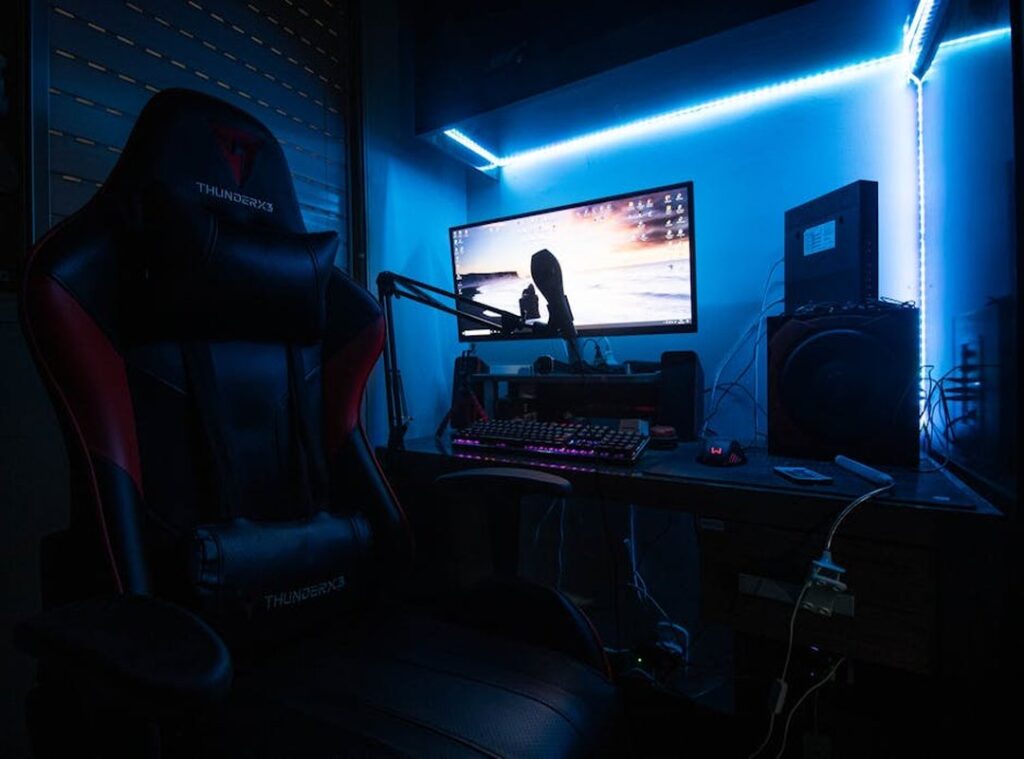
Here’s the fix: Bias Lighting. It sounds fancy, but it’s simple. Place a soft, indirect light source behind your monitor.
This creates a halo effect, reducing the harsh contrast between the screen and room. Trust me, your eyes will thank you. Aim for 6500K white.
Why? It keeps colors true, which is key when you’re deep in a game.
But don’t stop there. Other ambient sources can raise your setup. Smart bulbs in lamps or ceiling fixtures?
Yes, please. Keep them at a low, diffuse brightness. Direct light?
Avoid it like the plague. It causes glare, and nobody wants that during a key game moment.
Pro tip: Position a floor lamp in a corner facing the wall. It softens the room’s overall light. Or use light-diffusing shades.
These little tweaks make a big difference.
Lighting setups in gaming rooms aren’t just about aesthetics. They’re about comfort and endurance. Think about it.
Now, if you’re into optimizing things (and who isn’t?), consider checking out Optimizing Gaming Pc Performance Beginners. It’s a solid resource for enhancing your gaming experience beyond just lighting.
Would you rather game in a harsh, eye-straining environment or a cozy, inviting one? The choice is obvious.
So, don’t skimp on this foundational layer. Get your ambient lighting right, and you’ll set the stage for epic gaming sessions. It’s not just about playing; it’s about playing smart.
Layer 2: Precision Task Lighting for Flawless Control
Task lighting in gaming isn’t just a fancy add-on. It’s a game-changer. Picture this: focused light where you need it most (on) your keyboard, mousepad, and desk.
Why bother with task lighting? Simple. You want clear visibility without those pesky reflections on your monitor.
That’s what task lighting delivers. No more fumbling around in the dark or dealing with annoying screen glare.
It’s about precision. You can’t afford distractions when you’re in the zone. Ever tried a monitor light bar?
These little wonders sit on top of your screen, beaming light down onto your desk but not in your eyes. Genius, right?
Now, if light bars aren’t your thing, adjustable desk lamps are a solid alternative. Just make sure they’re positioned to the side of your monitor. You want a focused beam that doesn’t cast shadows over your gear.
Adjustability is key here. Both in position and brightness. Trust me, you’ll thank yourself later.
But there’s a trap. Don’t place a lamp behind you. Why?
Because it throws shadows of your hands all over the keyboard and mouse. You don’t need that kind of frustration. It’s about getting things right, not just bright.
For more on optimizing your space, check out lighting setups gaming rooms. They have some great ideas that might spark your own setup. Let’s face it, lighting can make or break your gaming experience.
So, why not make it flawless?
Layer 3: Immersive Accent Lighting – Bringing Your Game to Life
Accent lighting is the secret sauce that transforms a gaming room. It’s not just about making your setup look cool. It’s about making it feel immersive.

You want that environment to draw you in, make you feel like you’re part of the action. the RGB layer comes into play.
Think of RGB as a tool to create changing, responsive environments. It’s not just decoration. It’s a way to bring your games to life.
Place RGB strips behind the desk to create a wall wash effect. Or under the desk for a ground glow. Smart light panels like Nanoleaf or Govee on walls can create geometric patterns or ambient scenes.
These aren’t just lights; they’re mood setters.
Now, let’s talk zoning. It’s all about using different colors or effects to define areas. Imagine a chill zone with soft blues and greens.
Perfect for relaxation. Then, there’s the main gaming battlestation. It needs to be intense, maybe with reds or purples.
Zoning helps your room have personality.
And what about thematic arrangements? For sci-fi games, use cool blues and purples with a slow pulse effect. It feels like you’re in a futuristic world.
For a fantasy RPG, warm oranges and greens mimic a torchlit dungeon. These setups make the game world leap out.
Pro tip: don’t overdo it. Too many colors can clash. Stick to a theme and let it shine.
And remember, good cable management is key for these setups. You don’t want wires ruining your vibe. Check out cable management tips gaming setup to keep everything tidy.
In the end, lighting setups in gaming rooms are about creating an experience. It’s not just about what you see. It’s about how you feel.
So, go ahead and let your lighting tell a story.
The Control Center: Syncing Your Gaming Room Lights
You ever walk into a room and feel like you’re stepping into the future? That’s what a well-synced gaming room can do. The real magic behind these lighting setups gaming rooms is in their synchronized control.
It’s not just about slapping some LED strips around your monitor. Oh no, it’s about creating an experience.
Start with software ecosystems. Think Razer Chroma RGB, Corsair iCUE, or SignalRGB. These platforms let your lights react to in-game events.
Imagine your room flashing red when you take damage. It’s like a real-life health bar (minus the actual danger).
Smart home hubs are your other option. Using something like Philips Hue with its Sync Box or Govee, you can unify all your lights. Bias lights, wall panels, you name it.
They work together like a well-rehearsed band. Want that smooth integration? Stick with one primary brand or software.
Trust me, mixing and matching is a compatibility nightmare.
Pro tip: Choose your primary space wisely. It’ll save you headaches. You’ll thank me when your lighting doesn’t glitch mid-boss fight.
So, what’s your next move? Dive in, pick a platform, and start syncing. Welcome to your immersive gaming haven.
Light Up Your Game
Bad lighting can ruin your gaming experience. You know it, I know it. The answer?
A solid lighting setups gaming rooms plan. Start with ambient light, then layer on task and accent lighting. This isn’t just about aesthetics.
It’s about comfort, performance, and immersion. Get your setup right, and you’ll play better, feel better. Stop squinting at screens and start enjoying your game space.
Begin by assessing your current lighting. What needs fixing? Start with the basics.
Need a guide? You’re in the right place. Upgrade your setup today.
Ready to take your gaming room to the next level?
 Nicole Pettigrewayde is the kind of writer who genuinely cannot publish something without checking it twice. Maybe three times. They came to game strategy insights through years of hands-on work rather than theory, which means the things they writes about — Game Strategy Insights, Hot Topics in Gaming, Expert Breakdowns, among other areas — are things they has actually tested, questioned, and revised opinions on more than once.
That shows in the work. Nicole's pieces tend to go a level deeper than most. Not in a way that becomes unreadable, but in a way that makes you realize you'd been missing something important. They has a habit of finding the detail that everybody else glosses over and making it the center of the story — which sounds simple, but takes a rare combination of curiosity and patience to pull off consistently. The writing never feels rushed. It feels like someone who sat with the subject long enough to actually understand it.
Outside of specific topics, what Nicole cares about most is whether the reader walks away with something useful. Not impressed. Not entertained. Useful. That's a harder bar to clear than it sounds, and they clears it more often than not — which is why readers tend to remember Nicole's articles long after they've forgotten the headline.
Nicole Pettigrewayde is the kind of writer who genuinely cannot publish something without checking it twice. Maybe three times. They came to game strategy insights through years of hands-on work rather than theory, which means the things they writes about — Game Strategy Insights, Hot Topics in Gaming, Expert Breakdowns, among other areas — are things they has actually tested, questioned, and revised opinions on more than once.
That shows in the work. Nicole's pieces tend to go a level deeper than most. Not in a way that becomes unreadable, but in a way that makes you realize you'd been missing something important. They has a habit of finding the detail that everybody else glosses over and making it the center of the story — which sounds simple, but takes a rare combination of curiosity and patience to pull off consistently. The writing never feels rushed. It feels like someone who sat with the subject long enough to actually understand it.
Outside of specific topics, what Nicole cares about most is whether the reader walks away with something useful. Not impressed. Not entertained. Useful. That's a harder bar to clear than it sounds, and they clears it more often than not — which is why readers tend to remember Nicole's articles long after they've forgotten the headline.